Human in the loop: designing AI that asks before it acts
Human in the loop means an AI system proposes an action and a person approves, edits or rejects it before anything changes. To design it well, sort actions by risk, show a clear preview of each proposed change, and enforce the approval in code rather than in the prompt.
AI assistants used to answer questions. Now many of them can draft an email, update a customer record or prepare an invoice. That shift changes the design question from "is this answer right?" to "should this happen, and who decides?" This guide is for anyone choosing or building an assistant that touches real business data.
Three levels of human control
| Pattern | Who decides | Where it fits |
|---|---|---|
| Human in the loop | A person approves each action before it runs | Changes to records, money, anything sent to a customer |
| Human on the loop | The system acts; a person watches and can step in | High-volume, low-risk work that is easy to undo |
| Human out of the loop | Nobody reviews the action | Work that just reads, such as search and summaries |
Many business assistants mix all three. Search runs freely, routine edits are watched, and anything that leaves the building waits for a person. The design work is deciding which action belongs in which row.
Sort actions by risk before you design anything else
Start with a list of every tool the assistant can call, then place each one in a tier. The tier decides the control, not the other way around.
| Tier | Examples | Suggested control |
|---|---|---|
| Read | Search records, summarize a thread, answer a question | No approval; log what was read |
| Draft | Write an email draft, prepare a draft invoice | Nothing leaves until a person reviews and sends it |
| Reversible change | Update a field, add a note, change a status | Approve each change, with before and after values |
| Irreversible or external | Send, pay, delete, finalize a numbered document | Explicit approval every time; consider a second person |
Be strict about the bottom row. A sent email or a finalized invoice cannot be quietly taken back, so an assistant should never reach those actions without a clear yes.
What a good approval prompt shows
An approval step is useful when a person can decide in a few seconds and still be right. That depends on what the prompt puts in front of them.
- The action in plain words. "Change the payment terms on this customer" beats a tool name and a block of parameters.
- The exact record. Name the customer, invoice or project, so nobody approves a change to the wrong one.
- Before and after. Show the current value next to the proposed value for every field that changes.
- Why it is proposed. Point to the request or the source that led to the proposal.
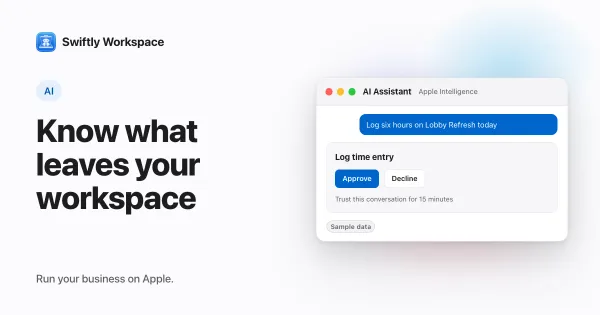
- Two clear choices. One button to approve and one to decline, plus a way to edit the proposal before approving it.
- What happens on no. Make it obvious that declining changes nothing.
Design rules that keep people in control
- Enforce approval in code, not in the prompt. An instruction such as "ask the user before acting" can be ignored, misread or overridden by text the model reads. The code that runs the tool should refuse to make a change until it holds a recorded approval.
- Give the assistant the narrowest tools it needs. If it never has to delete records, do not give it a delete tool. Least privilege limits what a mistake can reach. The guide to setting up AI agents and tool access for a team covers this in practice.
- Treat what the assistant reads as untrusted. An email, a web page or an attached document can carry instructions meant to steer the model. Reading alone carries less risk; reading combined with the power to send or change data is where injected text does the most harm.
- One approval, one change. Bundling ten edits behind one button hides the one that matters. If you batch, list every change and allow approving them one by one.
- Expire stale proposals. A proposal approved hours later may rest on data that has since changed. Re-check the record at approval time, or ask again.
- Log every proposal and decision. Record who approved what, when, and what the assistant proposed, including declined proposals. That history answers "why did this change?" months later.
Avoiding approval fatigue
The fastest way to break human in the loop is to ask too often. When every small step needs a click, people start approving without reading, and the control becomes a ritual. Keep approvals for actions that change something, keep reading and searching free of prompts, and make each prompt short enough to read in full.
It also helps to show people the cost of their choices. Each proposal can carry customer data to an AI provider and use paid tokens. The guide to what business data an AI assistant sends to the provider covers the data side, and what AI costs when you bring your own key covers the bill.
A checklist for choosing or building an assistant
- Which actions can it take without a person, and is that list written down?
- Is the approval checked by the system that runs the action, or merely requested in the prompt?
- Does the approval prompt show before and after values for the exact record?
- Can an administrator limit which tools each team or role may use?
- Is there a history of proposals, approvals and declines?
- What happens when the assistant is unsure: does it ask, or does it guess?
For a closer look at one approach, read about AI changes that wait for a person's yes.
Frequently asked questions
What is human in the loop AI?
It is a design where the AI proposes and a person decides. The system prepares an action, such as an edit or a message, and nothing happens until someone approves it. The person can also edit the proposal or decline it.
How do you design an AI approval workflow?
List the actions the assistant can take, sort them by risk, and attach a control to each tier. Show the action, the record and the before and after values in the approval prompt, and make the system that runs the action check for the approval.
Do AI agents need approval for every action?
No. Reading, searching and summarizing usually need no approval. Changes to records, anything sent outside the business and anything involving money are where approval earns its place.
What is the difference between human in the loop and human on the loop?
In the loop, a person approves each action before it runs. On the loop, the system acts by itself and a person monitors the results and can intervene. On the loop suits high-volume work that is easy to undo.
Run your business on Apple.
Questions about running your business on Mac, iPad and iPhone? Our team answers every message.
Contact support