Swiftly Workspace vs Salesforce Starter Suite: an honest comparison
We make Swiftly Workspace, so read this with that in mind.
Salesforce Starter Suite suits small sales teams that want to begin on a CRM they can grow into a large platform, with single sign-on in every edition. Swiftly Workspace suits service businesses that want customers, projects, approved timesheets and invoices in one native app for Mac, iPhone and iPad.
Choosing Starter Suite is often a choice about the future: you begin small on a CRM platform and add to it as you grow. Choosing Swiftly is a choice about the present month: the projects you are running, the hours your team logged and the invoices that have to go out. Both are reasonable. Which one fits depends on whether your business grows through a sales team or through delivered work.
Swiftly Workspace and Salesforce Starter Suite at a glance
| Salesforce Starter Suite | Swiftly Workspace | |
|---|---|---|
| Built for | Small businesses starting on a CRM platform | Service businesses billing client work |
| Apple apps | iPhone and iPad app; no Mac version listed | Native Mac app, plus iPhone and iPad |
| AI | Assistive AI with Employee Agent | Your own key for a provider such as OpenAI, Gemini or Mistral, or Apple Intelligence on the device |
| Single sign-on | Federated authentication in all editions | Not offered today |
| Pricing model | Per user per month, billed monthly or annually; no user maximum | Left out of this comparison |
Salesforce facts checked 2026-10-18 on salesforce.com, help.salesforce.com and the App Store: the small business pricing page, the single sign-on help page and the App Store listing. We leave prices out of this comparison on both sides.
What Salesforce Starter Suite does well
Starter Suite is Salesforce's CRM for small businesses that want to start quickly. It is priced per user per month, billed monthly or annually, and the pricing page's FAQ says there is no user maximum. A free trial is offered. Starter includes what Salesforce calls Assistive AI with Employee Agent. Salesforce's single sign-on help page lists federated authentication, its term for single sign-on, in all editions, which is generous for a small team that already signs in to everything through one identity provider.
On Apple devices, Salesforce's app covers iPhone and iPad, with no Mac version listed on the App Store. The bigger strength is where Starter Suite leads: the wider Salesforce platform. If you expect a growing sales team, more processes and more connected tools, beginning there can save a move later.
Where Swiftly Workspace is different
Swiftly is built for the work after the deal. The customer record holds the contacts, the projects, the invoices and the payments, so the people who deliver and the people who bill look at the same history. We explain why that matters in a CRM with invoicing versus two separate tools.
- Projects and approved hours. Projects break down into Phases, Work Packages and Tasks with a budgeted amount. Team members submit timesheets, and approvers review them in Timesheet Approvals.
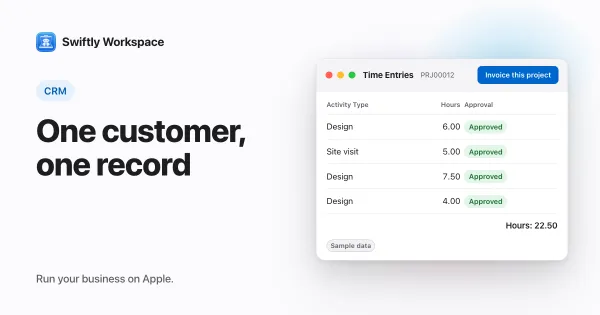
- From approved hours to a draft invoice. Invoice this project turns approved billable hours that are not yet invoiced into a draft invoice, which a person finalizes.
- Money on the customer. Invoices, credit notes and proforma invoices, each a draft a person finalizes, with customer payments allocated to the open invoice they pay. Vendors and their bills sit in the same workspace.
- Records you shape. Make a field visible, required or give it a default value, check a VAT number against VIES (the check is advisory), and see a change history on each record. Roles with field-level permissions decide who sees what.
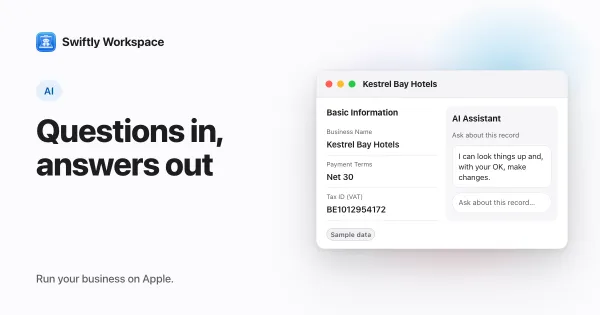
- Questions about your own data. In Conversations, ask about your customers and invoices; the assistant fetches what the question needs. See asking questions about your own business data.
- AI on your terms. Your company's own key for a provider such as OpenAI, Gemini or Mistral, or Apple Intelligence on the device, where the text isn't sent to a cloud AI provider.
Platform or workspace: the trade-off
A platform CRM and a workspace app make different promises, and it helps to name them.
- Room to grow. A platform is built to take on more teams, more processes and more connected tools over time. A workspace is built to cover a smaller set of jobs well from the start.
- Setup. A platform usually asks for more decisions up front: which objects, which fields, which rules. A workspace comes with its records already shaped, and you adjust the fields.
- Who runs it. As a platform grows, many businesses give someone the job of looking after it. A workspace for a small team is usually run by whoever owns the business.
Neither is better in general. If you are a five-person consultancy, the platform's room to grow may be room you never use. If you are hiring a sales team next year, a workspace may be the tool you outgrow. A useful exercise is to write down the three jobs your CRM must do in the coming year, and check each tool against that list rather than against everything it could do one day.
Choose Salesforce Starter Suite if
- Your business grows through a sales team working leads and deals.
- You expect to grow into the wider Salesforce platform.
- You need single sign-on from the entry edition.
Choose Swiftly Workspace if
- Your revenue comes from billed client work rather than a large sales funnel.
- Hours need a manager's approval before they are invoiced.
- You want projects, invoices, credit notes and payments on the same customer record.
- Your team works on Macs, iPhones and iPads and wants a native app on each.
What Swiftly Workspace doesn't do
Swiftly doesn't offer company single sign-on today; our explainer on single sign-on for a small business covers what to ask any vendor. It has no estimates, no email sync and no mail client, and it is not accounting software. It runs on Apple devices. If most of your week goes to finding new customers, start with a sales CRM. For the bigger picture, read our CRM guide for small service businesses, our roundup of HubSpot alternatives for small service businesses, or how we compare with our HubSpot comparison and our Zoho CRM comparison.
What to test in a trial
Take one customer you served last quarter and follow them through each tool: the opening contact, the work you did and the invoice they paid. In Salesforce, note how much you set up before the record looked right. In Swiftly, have someone approve the hours and turn them into the invoice without help. Then ask who would look after each tool a year from now. To try Swiftly with your own records, Swiftly Workspace imports customers and their contacts, vendors, items, open invoices, payments and projects from CSV or XLSX; bring across invoices that are still fully unpaid.
Frequently asked questions
Is there a Salesforce app for Mac?
Salesforce's App Store listing covers iPhone and iPad, with no Mac version listed (checked 2026-10-18). Swiftly Workspace has a native Mac app alongside its iPhone and iPad app.
Does Salesforce Starter Suite include single sign-on?
Salesforce's help page lists federated authentication, its term for single sign-on, in all editions (checked 2026-10-18). Swiftly Workspace doesn't offer company single sign-on today.
Can Swiftly Workspace grow into a platform like Salesforce?
No, and it isn't meant to. Swiftly covers a defined set of jobs for service businesses: customers, projects, approved timesheets, invoices and payments. If you expect to add many teams and processes on one platform, Starter Suite is the better place to begin.
Run your business on Apple.
Create your account on the web, then set up your workspace in the app on your iPhone, iPad or Mac.